Reports
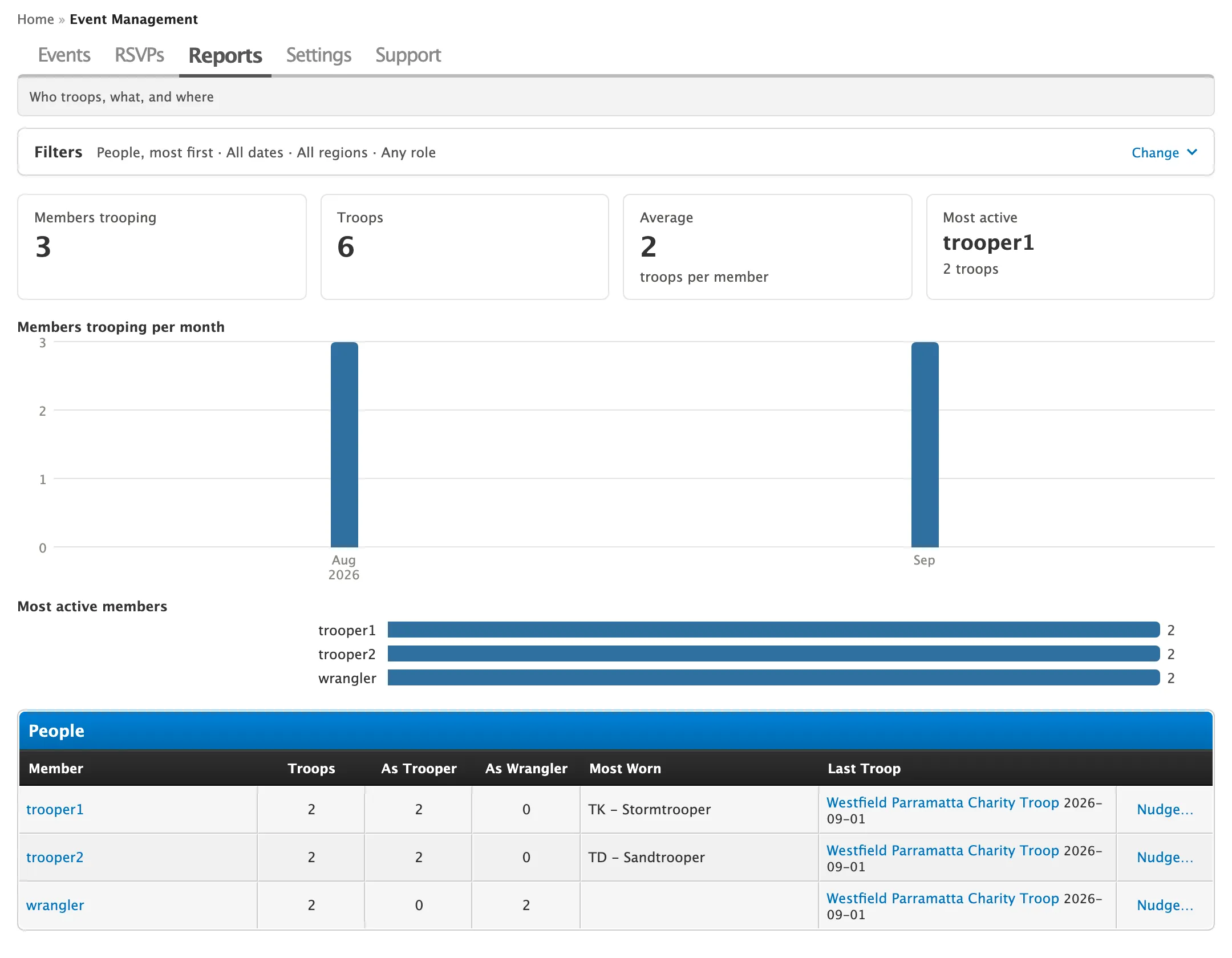
Go to Admin CP > Event Management > Reports. Coordinators with Admin CP access can use it too.
Reports count troops from posted troop reports. Events without a report, and social events, aren’t counted.
| View | Shows |
|---|---|
| People | Troops per member as trooper and wrangler, their most worn costume and last troop. |
| Events | Each event’s turnout against signups. |
| Regions | Troops, events and members per region. |
| Costumes | How often each costume was worn, and by how many members. |
Each view has summary cards, a month-by-month chart, and a top-ten chart above the table.
Filter and sort
Section titled “Filter and sort”Click the bar above the view to set the Order (Most first or Least first), From and To dates, Region and Role, then click Show Report.
Least first starts with members who’ve trooped once. Members who’ve never trooped aren’t listed.
Nudge a member
Section titled “Nudge a member”Encourage a member who hasn’t trooped lately to come back out.
-
In the People view, set Order to Least first, or filter to an earlier date range.
-
Click Nudge… beside the member.
-
Edit the drafted message, which mentions their last troop.
-
Click Send PM, or copy the message to send another way.