Managing events
Go to Admin CP > Event Management > Events.
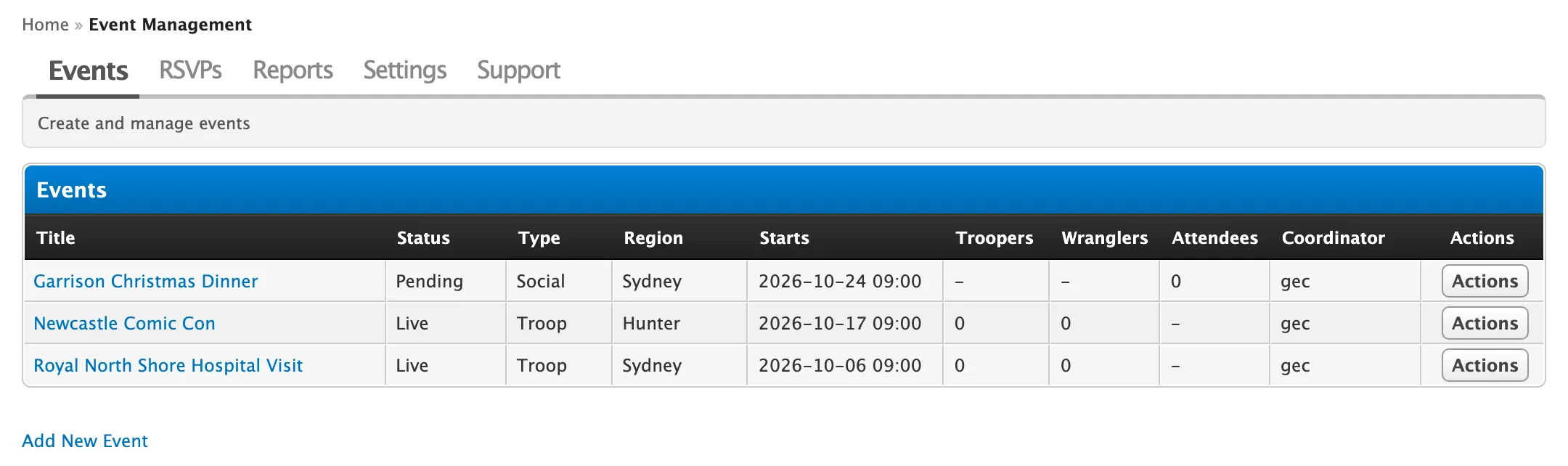
The list shows every event with its status, type, region, start, signup counts and coordinator. Coordinators with Admin CP access only see their own events here.
Click Actions on an event for:
| Option | Does |
|---|---|
| Edit | Opens the event form. |
| View RSVPs | Opens the event on the RSVPs tab. |
| Make Live | Opens signups and posts the announcement thread. |
| Archive | Closes the event out and hides it from the events list. |
| Delete | See below. |
To add an event, click Add New Event. It’s the same form coordinators use on the forum.
Delete an event
Section titled “Delete an event”Deleting removes the event and everything attached to it:
- its signups and waitlist
- its announcement thread and every reply
- the troop counts from its report, from Reports and My Troops
The troop report thread itself stays in the troop reports forum.
-
Click Actions > Delete on the event.
-
Confirm.